Grocery Software

Grocery Mobile App & Website Development

Launch Your Own Online Grocery Delivery Business

Build a complete grocery delivery ecosystem with a customer mobile app, online grocery ordering website, delivery rider app, vendor dashboard and powerful admin panel.

Overview

What is a Grocery Delivery App?

A Grocery Delivery App is a digital platform that allows customers to browse grocery products, place orders online and receive their purchases at their doorstep.
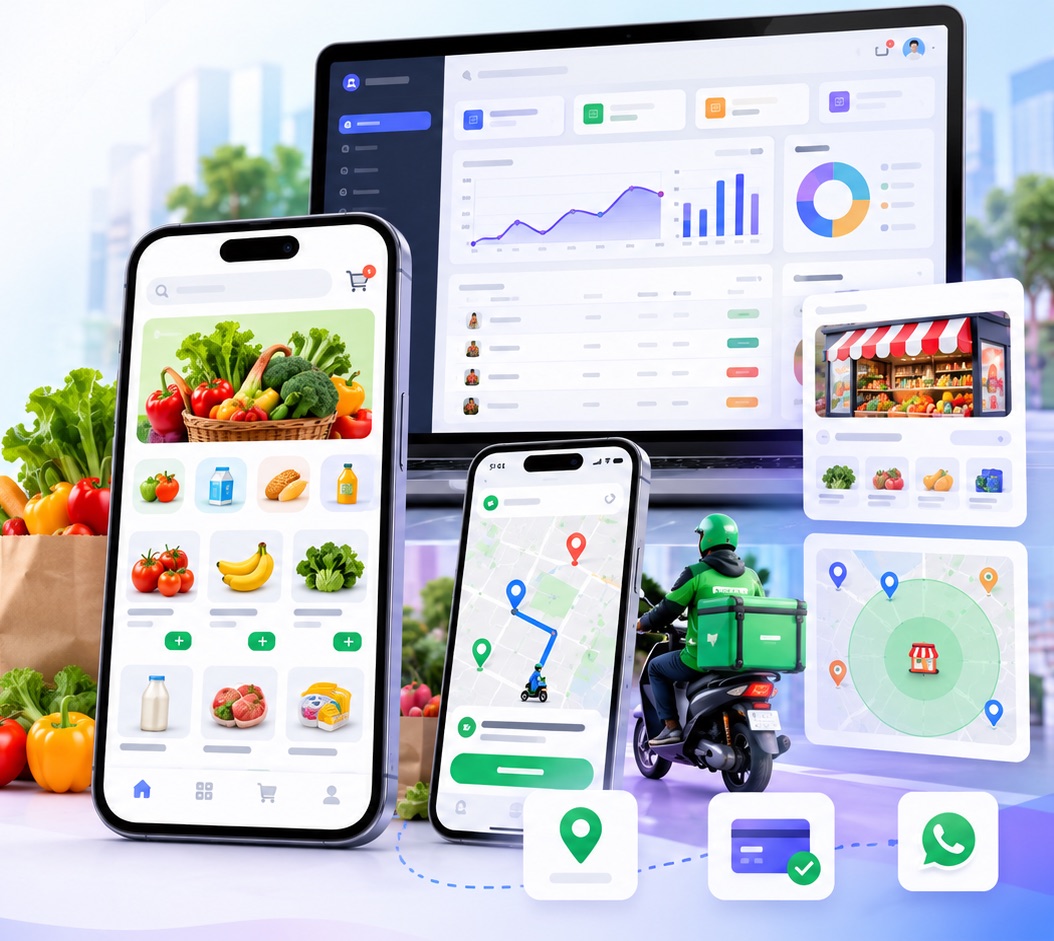
Grocery delivery mobile app, rider app and admin dashboard shown together

A complete grocery delivery system connects customers, store owners, vendors, delivery riders and administrators through a centralized software platform.

The system can support a single grocery store or multiple independent grocery vendors operating through one marketplace.

The objective is to manage the entire grocery ordering and delivery process from one integrated system.

Depending on the selected business model, the platform can include

  • Customer mobile applications for Android and iOS.
  • A responsive grocery shopping website.
  • A store or vendor management dashboard.
  • A rider application for order delivery.
  • An admin dashboard for centralized operations.
  • Inventory, product, order and delivery management.
  • Payment gateway and refund integrations.
  • Location-based store discovery and delivery coverage.
  • SMS, WhatsApp and push notification integrations.
  • Reports, commissions, settlements and business analytics.
Business models

Single-Vendor vs Multi-Vendor Grocery Systems

Choose the model that matches how your grocery business operates today and how you plan to grow.

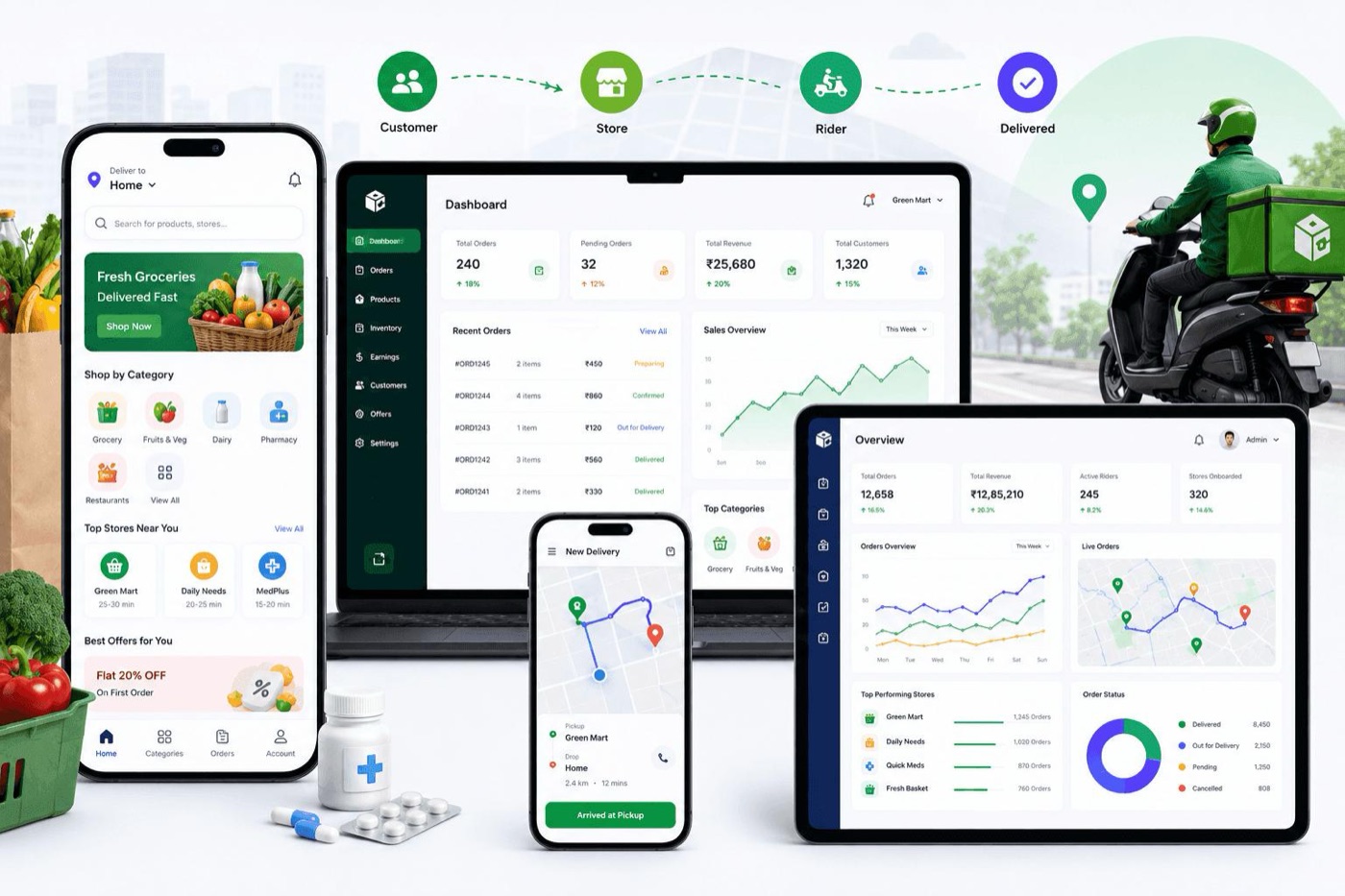
How a grocery delivery platform works: customer app, store dashboard, rider app and admin dashboard from order to delivery
How it fits together: customer order, store dashboard, rider delivery and admin control in one connected platform.

Key differences at a glance

FeatureSingle VendorMulti Vendor
Store ownershipOne businessMultiple businesses
Product managementCentral admin/storeEach vendor manages their catalog
InventoryCentralizedSeparate vendor inventory
Delivery radiusStore/warehouse radiusIndividual vendor radius
Order assignmentOne storeRelevant eligible vendor(s)
Commission managementUsually unnecessaryVendor-wise commission
SettlementsBusiness accountsVendor-wise payout records
Admin complexityLowerHigher
Best forExisting supermarket or retailerGrocery marketplace startup

Important: In a multi-vendor system, a customer's cart can contain products from multiple vendors, but this feature must be designed separately. In that case the system must manage a parent order with vendor-wise sub-orders, separate preparation, delivery charges, refunds and settlement logic. For a simple MVP, it is practical to start with a one-vendor-per-order model.

How Single-Vendor and Multi-Vendor Systems Work

Single-Vendor Grocery System

Ideal for supermarket owners, grocery retailers, wholesalers and businesses that want to sell products from their own store or warehouse. The business operates under one brand and controls its product catalog, inventory, pricing, order processing and delivery operations.

How it works

  1. The administrator adds grocery categories, products, prices, stock quantities and delivery settings.
  2. Customers browse products through the mobile app or website.
  3. Customers add products to their cart, select an address and place an order.
  4. The system validates product availability and checks whether the address falls within the configured delivery area.
  5. The store receives the order and confirms it.
  6. Store staff prepare and pack the order.
  7. An administrator or delivery allocation system assigns an available rider.
  8. The rider delivers the order and updates the delivery status.
  9. The customer receives order updates and can view order history.
Example: A supermarket in Patna wants to accept online grocery orders from nearby residential areas. Its own store manages all products, while its delivery team handles customer orders.

How Single-Vendor and Multi-Vendor Systems Work

Multi-Vendor Grocery System

Allows multiple independent grocery stores, supermarkets and local retailers to register on one platform and sell their products. Each vendor manages their own store profile, delivery radius, product catalog, inventory, operating hours and order preparation. The marketplace owner controls vendor approvals, commissions, platform settings, payments, disputes and overall business performance.

How it works

  1. Vendors register or are onboarded by the administrator.
  2. The administrator verifies vendor information and activates approved stores.
  3. Each vendor configures their store location, operating hours and delivery coverage.
  4. Vendors add products, prices, stock quantities and product images.
  5. Customers enter their delivery address.
  6. The system finds eligible stores using location, delivery coverage, operating status and product availability.
  7. Customers browse eligible stores and place orders.
  8. The relevant vendor receives the order and prepares it.
  9. A rider is assigned according to the selected delivery model.
  10. The system records the order, commission, vendor payable and applicable platform charges.
Example: A grocery marketplace operates in multiple neighborhoods. Customers can discover eligible local stores, while each vendor independently manages their products and store operations.

Features

Complete Feature List for Every App and Dashboard

Pick a tab to see what each part of the grocery platform includes.

Everything your customers need to discover products, order and track deliveries on Android and iOS.

AreaWhat it includes
ALogin and Customer Registration
  • Mobile number login with OTP verification.
  • Optional email registration and social login.
  • Customer profile and saved addresses.
  • Default delivery address selection.
  • Location permission and manual address entry.
BHome Screen
  • Promotional banners and offers.
  • Product categories and subcategories.
  • Nearby eligible stores for multi-vendor mode.
  • Featured, popular and recently added products.
  • Search bar with product suggestions.
  • Repeat order and recently purchased items.
CProduct Catalog
  • Product name, image, description and brand.
  • MRP, selling price and discount.
  • Unit or pack size: kg, gram, litre, piece and pack.
  • Product availability and stock status.
  • Product variants and quantity selection.
  • Search, sorting and category filters.
DCart and Checkout
  • Add, remove and update quantities.
  • Apply coupon codes.
  • Delivery address selection.
  • Delivery fee, taxes and applicable charges.
  • Minimum order validation.
  • Delivery slot selection, if enabled.
  • Online payment or Cash on Delivery, if enabled.
  • Final price breakdown before order placement.
EOrders and Tracking
  • Order confirmation and order history.
  • Order status timeline.
  • Cancel order according to business policy.
  • Rider details after assignment.
  • Live rider location, where enabled.
  • Estimated delivery time.
  • Digital invoice and refund status.
FCustomer Engagement
  • Push notifications.
  • SMS and WhatsApp order updates.
  • Ratings and reviews.
  • Help, complaints and support contact.
  • Wishlist and saved products, if included.
  • Referral codes and loyalty points, as optional modules.
GAccount and Privacy
  • Edit profile and addresses.
  • Manage notification preferences.
  • Terms, privacy policy and refund policy.
  • Request account deletion, subject to applicable record-retention requirements.

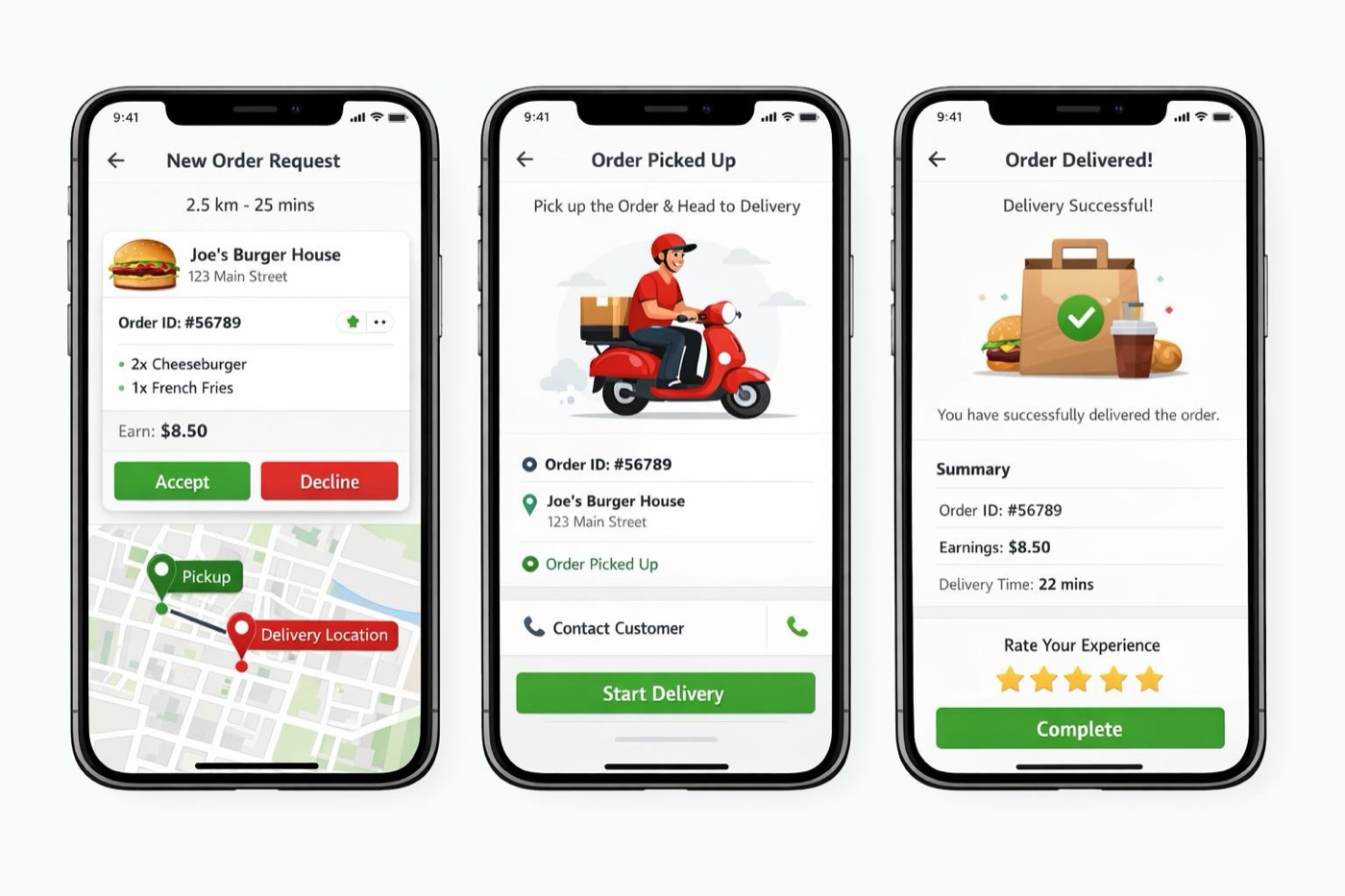
A focused delivery app for riders to accept orders, navigate, hand over and track earnings.

Delivery rider app screens: new order request, order picked up and order delivered
Rider app: accept an order request, pick up and navigate, then complete the delivery (sample screens).
AreaWhat it includes
ARider Registration and Verification
  • Mobile number login with OTP.
  • Name, profile photo and contact details.
  • Vehicle type and registration details, where applicable.
  • Required identity and document verification.
  • Admin approval and account activation.
  • Availability status: Online, Offline or Busy.
BRider Dashboard
  • New delivery requests.
  • Accepted and active deliveries.
  • Completed and cancelled deliveries.
  • Today's earnings and delivery history.
  • Assigned orders and current task status.
COrder Acceptance and Pickup
  • Receive delivery requests.
  • View pickup store, customer area and estimated distance.
  • Accept or reject requests within the configured response period.
  • Navigate to the store.
  • Confirm arrival at pickup.
  • Verify order number or pickup OTP, if enabled.
  • Confirm package collection.
DNavigation and Delivery
  • Open turn-by-turn navigation in Google Maps or an integrated navigation experience.
  • View customer address and delivery instructions.
  • Call the customer using an approved contact workflow.
  • Update status to Out for Delivery.
  • Share live location while on an active delivery, subject to permissions.
  • Mark delivery as completed using OTP, signature or delivery photo, where required.
EDelivery Exceptions
  • Customer unavailable.
  • Incorrect or inaccessible address.
  • Customer cancellation request.
  • Package issue or missing item.
  • Failed delivery and return-to-store process.
  • Contact support or report an incident.
FEarnings and History
  • Per-delivery earnings.
  • Incentives and bonuses, if configured.
  • Cash collected and cash reconciliation.
  • Completed delivery history.
  • Settlement records for applicable payment models.
GSecurity and Permissions
  • Location access only for defined delivery functions.
  • Secure login and session management.
  • Restricted access to assigned customer orders.
  • Background location updates only when necessary and permitted.
  • Logout and account suspension handling.

Rider assignment logic: The platform can assign riders manually through the admin dashboard or automatically using rider availability, proximity, workload and delivery capacity. Rider assignment and vendor selection are two separate decisions: the vendor is chosen based on order eligibility, while the rider is selected based on the delivery model.

Store owners and vendors manage their catalog, stock, orders and payouts from one dashboard.

AreaWhat it includes
AStore Management
  • Store profile, logo, images and business details.
  • Store address and map pin.
  • Operating hours and temporary closure.
  • Store approval status.
  • Delivery radius and service coverage.
  • Minimum order value and delivery charges.
  • Accept or pause new orders.
BProduct and Category Management
  • Create and edit product categories.
  • Add products, descriptions and images.
  • Set MRP, selling price and discounts.
  • Manage unit sizes and variants.
  • Update stock quantities.
  • Mark products unavailable.
  • Import products in bulk, if enabled.
CInventory Management
  • Stock-in and stock-out records.
  • Low-stock alerts.
  • Out-of-stock notifications.
  • Inventory adjustment history.
  • Optional batch, expiry and barcode tracking.
DOrder Management
  • New, accepted and rejected orders.
  • Confirm or reject orders with a reason.
  • Preparation and packing status.
  • Ready-for-pickup status.
  • Rider assignment visibility.
  • Cancellation, replacement and refund requests.
  • Print order slips and invoices.
EFinance and Reporting
  • Sales reports and order totals.
  • Platform commission statements.
  • Vendor payable and settlement history.
  • Refund and adjustment records.
  • Downloadable reports.
  • Customer reviews and feedback.
FTeam and Access
  • Staff accounts and role permissions.
  • Store-specific activity logs.
  • Notifications for new orders and stock alerts.
  • Access restrictions for sensitive financial information.

Central control for the platform owner: vendors, customers, riders, orders, payments and settings.

AreaWhat it includes
ADashboard and Analytics
  • Total orders, sales and completed deliveries.
  • Revenue, commission and refund summaries.
  • Active vendors, riders and customers.
  • Order status overview.
  • Best-selling products and categories.
  • Vendor and delivery performance reports.
BVendor Management
  • Vendor registration and onboarding.
  • Document verification and approvals.
  • Store profile and location management.
  • Delivery radius and coverage limits.
  • Vendor commission configuration.
  • Vendor suspension and reactivation.
  • Vendor-wise sales and settlement reports.
CCustomer Management
  • Customer profiles and order history.
  • Address and support information.
  • Customer complaints and dispute handling.
  • Account restrictions and deletion requests.
  • Customer segmentation, where required.
DRider Management
  • Rider registration and verification.
  • Rider approval and activation.
  • Online/offline and availability status.
  • Delivery assignment and reassignment.
  • Delivery performance and earnings.
  • Incident and failed-delivery management.
ECatalog and Inventory Oversight
  • Global categories and product attributes.
  • Vendor product approval, if required.
  • Featured products and promotional banners.
  • Restricted product rules.
  • Stock and availability monitoring.
FOrder and Delivery Control
  • View all orders and their histories.
  • Assign or reassign delivery riders.
  • Monitor active deliveries on a map.
  • Handle cancellations and delivery exceptions.
  • Manage delivery zones, fees and time slots.
  • Configure single-vendor or multi-vendor order rules.
GPayments, Commission and Settlements
  • Payment transaction records.
  • Online payment and Cash on Delivery reports.
  • Vendor commission rules.
  • Vendor payable ledger.
  • Refund tracking.
  • Settlement approval and payout records.
  • Reconciliation reports.
HPromotions and Notifications
  • Coupon and discount management.
  • Promotional campaigns and banners.
  • SMS and WhatsApp templates.
  • Push notification campaigns.
  • Customer consent and opt-out management.
ISystem Settings and Security
  • Business profile and app branding.
  • Tax and invoice settings.
  • Payment and notification provider configuration.
  • Role-based access control.
  • Audit logs and activity tracking.
  • Backup, monitoring and error logs.
  • API usage and integration settings.

Delivery coverage

Vendor-Wise Delivery Radius System

This is the core functionality of a multi-vendor grocery app. Each vendor sets their store location and maximum delivery radius, and customers only see stores that can actually deliver to them.

Delivery settings in the Vendor Dashboard

Each vendor can configure their delivery coverage with these fields:

  • Store Name
  • Store Address
  • Store Latitude and Longitude
  • Delivery Radius (for example, 2 km, 5 km, 8 km or a custom limit)
  • Minimum Order Value
  • Delivery Fee
  • Free Delivery Threshold
  • Estimated Preparation Time
  • Store Opening and Closing Hours
  • Accepting Orders: On/Off
  • Delivery Method: Own Riders or Platform Riders
  • Maximum Active Orders (optional)

The system uses the store's saved coordinates and the customer's delivery coordinates to decide whether the customer is eligible for delivery. The vendor can update the radius within the limits configured by the platform administrator.

How order filtering works

  1. Customer selects or enters a delivery address.
  2. The system converts the address into latitude and longitude, if needed.
  3. The backend finds active vendors near the customer's location.
  4. It checks whether the customer is within each vendor's configured radius.
  5. It checks store status, operating hours, product availability and delivery rules.
  6. Eligible vendors are shown to the customer.
  7. When the order is submitted, the backend validates eligibility and stock again before confirming it.

Technical distinction: Straight-line distance and actual road distance are different. A radius rule can use the geographic distance between coordinates, while a road-distance rule can use the Google Routes API. If delivery must follow a specific service boundary, such as selected PIN codes or irregular neighborhood borders, polygon-based geofencing can be used instead of a simple radius.

Integrations and technology

Integrations, Technology and Security

Maps, payments, notifications, the technology stack and security, all in one place. Pick a tab.

Google Maps integration

Google Maps APIs in a Grocery Platform

In grocery software, Google Maps is not only for showing a map. It can be used for address selection, vendor discovery, delivery coverage and rider navigation.

API / SDKWhere it is used
Maps SDK for Android / iOSShowing maps inside the customer and rider apps.
Maps JavaScript APIInteractive maps on the website and admin dashboard.
Places APIAddress search, autocomplete and place details.
Geocoding APIConverting an address to coordinates, and coordinates back to an address.
Routes APIRoad route, estimated travel time and distance.
Route MatrixComparing multiple rider, store and customer route combinations, where needed.

Practical examples

  • Customer App: The customer searches for a delivery address and can adjust the pin on the map.
  • Vendor Dashboard: The store owner confirms the store location and configures the delivery radius.
  • Admin Dashboard: The admin sees vendor locations, service areas and active deliveries.
  • Rider App: The rider gets navigation to the pickup and delivery locations.
  • Checkout: The system verifies the customer's location against the selected store's eligibility.

Implementation note: Not every feature needs a Google API. Radius filtering can also be done on the backend using coordinates. The Google Routes API is useful when actual road distance, travel time or route-based decisions are required. API keys should be restricted per platform, server credentials kept private, and usage quotas and billing alerts configured.

Payment Gateway Integration

The grocery platform can integrate a payment gateway such as Razorpay, Cashfree or another supported provider, based on the business's requirements and eligibility.

Customer payment methods may include

  • UPI.
  • Debit and credit cards.
  • Net banking.
  • Supported wallets.
  • Cash on Delivery, if enabled.

Multi-vendor payment requirements

  • Calculate platform commission.
  • Maintain vendor-wise payable balances.
  • Record payment gateway fees and refunds.
  • Generate settlement reports.
  • Support vendor payouts through a supported marketplace or payout arrangement, if required.

Where payment integration is used

  1. Customer checkout: Create a payment order from the backend.
  2. Payment screen: Allow the customer to complete the payment through the provider's supported checkout.
  3. Payment verification: Verify the transaction on the backend before confirming the paid status.
  4. Webhooks: Receive asynchronous payment success, failure and refund events.
  5. Order management: Update the order's payment status.
  6. Refunds: Initiate and track eligible refunds.
  7. Finance dashboard: Reconcile orders, payments, fees and refunds.

Note for marketplaces: A multi-vendor marketplace should not assume that a normal single-merchant checkout automatically splits funds between vendors. The required marketplace or payout capabilities must be confirmed with the payment provider before implementation.

SMS, WhatsApp and Push Notification Integrations

Keep customers, vendors and riders informed at every step of the order with automated notifications across SMS, WhatsApp, push and email.

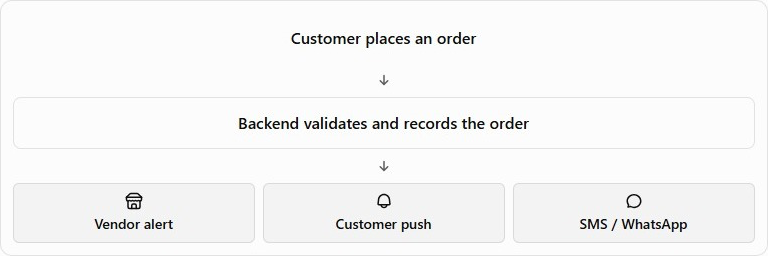
Order notification flow: customer places an order, backend validates and records it, then vendor alert, customer push and SMS or WhatsApp are sent
Order notification flow
IntegrationUse case
SMS GatewayLogin OTP, order confirmation, delivery updates.
WhatsApp Business Platform APIOrder confirmations, dispatch alerts, delivery notifications and support.
Firebase Cloud Messaging (FCM)Push notifications for Android, iOS and web, as configured.
Email serviceInvoices, receipts and account-related communication.

Firebase Cloud Messaging supports cross-platform notifications through a trusted server environment and client applications.

Suggested order notifications

  • Order placed and confirmed.
  • Vendor accepts or rejects the order.
  • Order is being packed.
  • Rider assigned.
  • Order out for delivery.
  • Delivery completed.
  • Payment failure or refund status.

WhatsApp templates: WhatsApp Business Platform integrations may require approved message templates for business-initiated notifications outside the customer-service window. Customer consent, template approval and provider charges must be considered.

Technology stack

The technology stack can be finalized according to the project scope, expected traffic, budget and scalability requirements.

Suggested stack for a custom grocery delivery platform

  • Customer App: React Native or Flutter.
  • Rider App: React Native or Flutter.
  • Website: React.js with server-side rendering or an SEO-friendly framework.
  • Admin and Vendor Dashboards: React.js.
  • Backend: Node.js with Express.js or a suitable backend framework.
  • Database: MongoDB or PostgreSQL, selected according to data relationships and reporting requirements.
  • APIs: REST APIs for communication between applications and the backend.
  • Real-time updates: WebSockets or another suitable real-time messaging mechanism.
  • Maps: Google Maps Platform APIs and SDKs.
  • Payments: A supported payment gateway.
  • Notifications: Firebase Cloud Messaging, SMS gateway and WhatsApp Business Platform.
  • Hosting: A suitable cloud or managed hosting environment with monitoring, backups and scaling options.

The architecture should support separate user roles, secure API access, reliable order processing, payment verification and future feature expansion.

Security and data protection

Security and data protection

A grocery delivery platform must protect customer data, payment information, vendor records and rider location data. The implementation should consider:

  • Role-based access for customers, riders, vendors and administrators.
  • Secure authentication and session handling.
  • Server-side validation of prices, discounts, inventory and order eligibility.
  • Secure storage of API credentials and payment secrets.
  • Payment signature verification and duplicate-event protection.
  • Rate limiting and OTP abuse prevention.
  • Audit logs for refunds, order changes and settlements.
  • Encrypted network communication using HTTPS.
  • Database backups and recovery procedures.
  • Error monitoring and operational alerts.
  • Appropriate privacy controls for customer and rider location data.
  • Applicable privacy, consumer protection, tax and payment-provider requirements.

Payment data: Sensitive payment details should be handled through the payment provider's approved flow rather than stored directly in the application without a valid, compliant architecture.

Launch essentials

What You Need to Launch

A quick summary of the third-party services, store fees and technical basics every grocery app project needs.

Third-party services at a glance
ServiceWhat it does
Google MapsStore locator, address search, maps and rider navigation.
Payment GatewayOnline payments and checkout processing.
SMS GatewayLogin OTPs and transactional order alerts.
WhatsApp Business APICustomer messaging and order updates.
FirebasePush notifications, authentication and real-time data, as configured.

Charges for these services depend on the provider and your usage, so they are not listed here.

App store publishing fees
Google Play Store$25 USDone-timeLifetime registration fee. Covers unlimited app publications.
Apple App Store$100 USDper yearAnnual fee, renewed every year to keep your apps published.

Only fixed, confirmed store fees are shown. Other project costs vary and are not listed.

Domain and hosting

Domain

Your domain is your web address, for example yourbrand.com. It is registered through a domain registrar and renewed periodically. It is used for your website, email addresses and links to your app.

Hosting

Hosting is the server environment where your website, vendor and admin dashboards and backend run. We choose a suitable cloud or managed hosting setup based on your expected traffic, with monitoring, backups and room to scale.

DUNS number for app store accounts

A DUNS number is a unique nine-digit business identifier issued by Dun & Bradstreet. App stores can use it to verify that a company is a registered business.

  • Google Play Store: individual account registration is optional, and company registration can often proceed without extensive documentation.
  • Apple App Store: company registration strictly requires a DUNS number.

How to get one for Apple

  1. Complete the official registration of your company.
  2. Apply for a DUNS number and wait for approval.
  3. Once approved, Apple can verify your corporate iOS developer account.

Apply for the DUNS number well before your planned iOS launch date.

FAQs

Grocery App Development: Frequently Asked Questions

Can I build a grocery app for only my own shop?

Yes. A single-vendor system is suitable for one supermarket, grocery shop or warehouse. You can manage products, inventory, orders and deliveries under your own brand.

Can multiple grocery stores register on one platform?

Yes. A multi-vendor system lets multiple independent grocery stores, supermarkets and local retailers register on one platform and sell their products. Vendors are onboarded and approved by the administrator, and each vendor manages their own store profile, catalog, inventory and order preparation.

Can every vendor set their own delivery radius?

Yes. Each vendor sets their store location and maximum delivery radius from the Vendor Dashboard, along with the minimum order value, delivery fee and operating hours. The platform administrator can configure the limits within which vendors may change their radius.

Can customers track their delivery riders live?

Yes, where enabled. Customers can follow an order status timeline, see rider details after assignment and view the live rider location and estimated delivery time. The rider app shares live location only during an active delivery and subject to permissions.

Can the app support UPI and Cash on Delivery?

Yes. Through a payment gateway such as Razorpay or Cashfree, customers can pay using UPI, debit and credit cards, net banking and supported wallets. Cash on Delivery can be enabled as an additional option, with cash collection and reconciliation records for riders.

Can I receive order alerts on WhatsApp and SMS?

Yes. The platform can send order notifications through an SMS gateway, the WhatsApp Business Platform, push notifications and email. WhatsApp messages sent by the business may need approved templates and customer consent, and provider charges apply.

Can one customer order from multiple grocery stores at once?

It is possible, but it must be designed separately. The system then manages a parent order with vendor-wise sub-orders, separate preparation, delivery charges, refunds and settlement logic. For a simple first version, we recommend starting with one vendor per order.

Can the platform be expanded later?

Yes. The architecture is planned for separate user roles, secure APIs, reliable order processing and future feature expansion. Optional modules such as referral codes and loyalty points can be added as the business grows.

People with laptops around large FAQ letters and a magnifying glass

Related services

Explore More From SoftFYR

Get started

Ready to Launch Your Grocery Delivery Business?

Have a business idea? Share your requirements with our team and explore the right grocery software solution for your business. Tell us whether you need a single-vendor or multi-vendor platform, the apps you want, and your delivery area.

Tell Us About Your Grocery Business

Share a few details and our team will get back to you with the right grocery software solution.

No obligationWe reply shortlyYour details stay private
+91
Required platforms *