Food Delivery Software

Food Delivery App Development

Build a Powerful Food Delivery App for Your Business

Build your own food delivery platform with customer apps, delivery partner apps, restaurant management, admin dashboard, payment gateway and live order tracking.

Overview

Food Delivery App Development – Overview

Looking for a reliable Food Delivery App Development Company to launch your online food ordering business? SoftFYR Technologies provides customized food delivery app development solutions designed to help restaurants, cloud kitchens, food chains, and startups manage their online ordering and delivery operations efficiently.
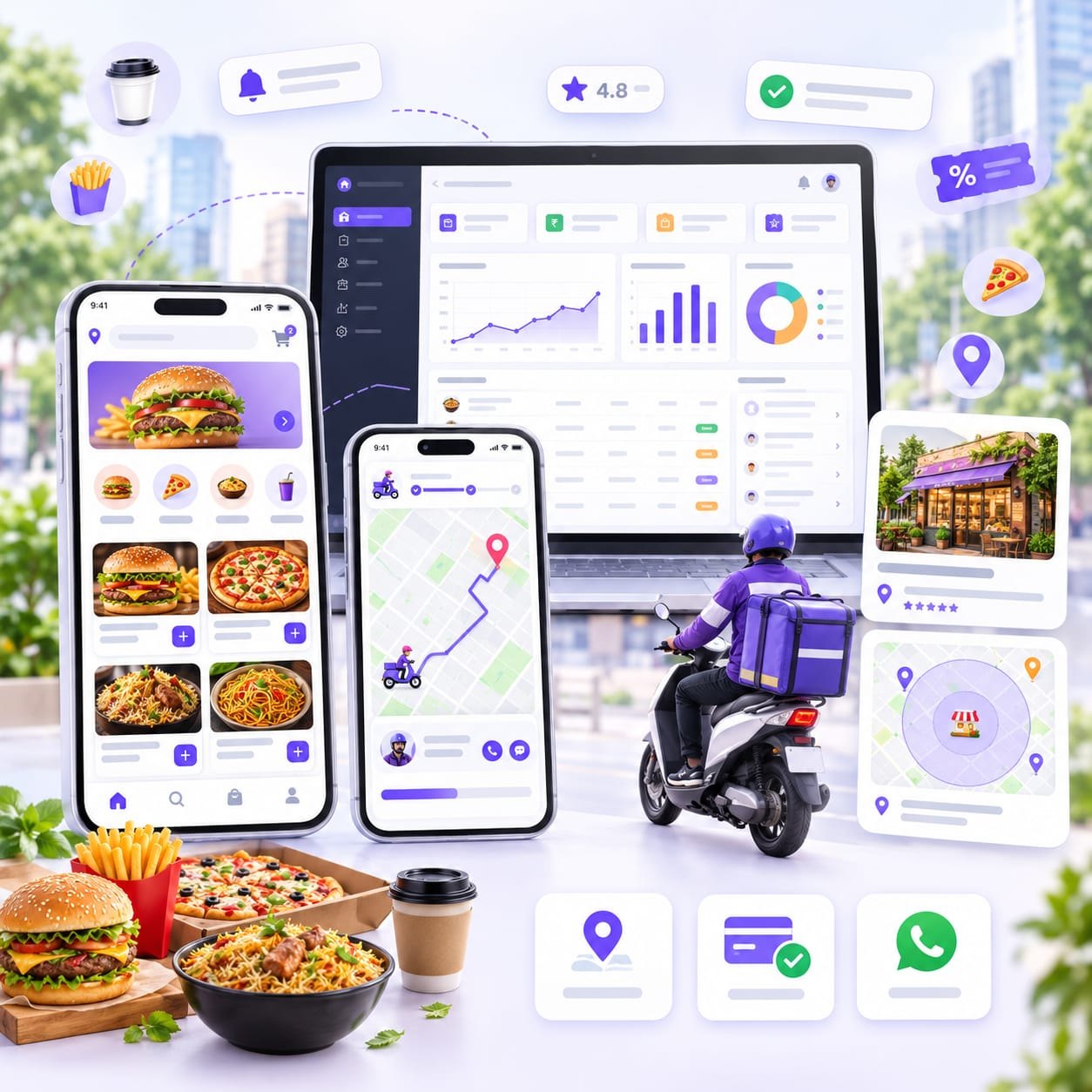
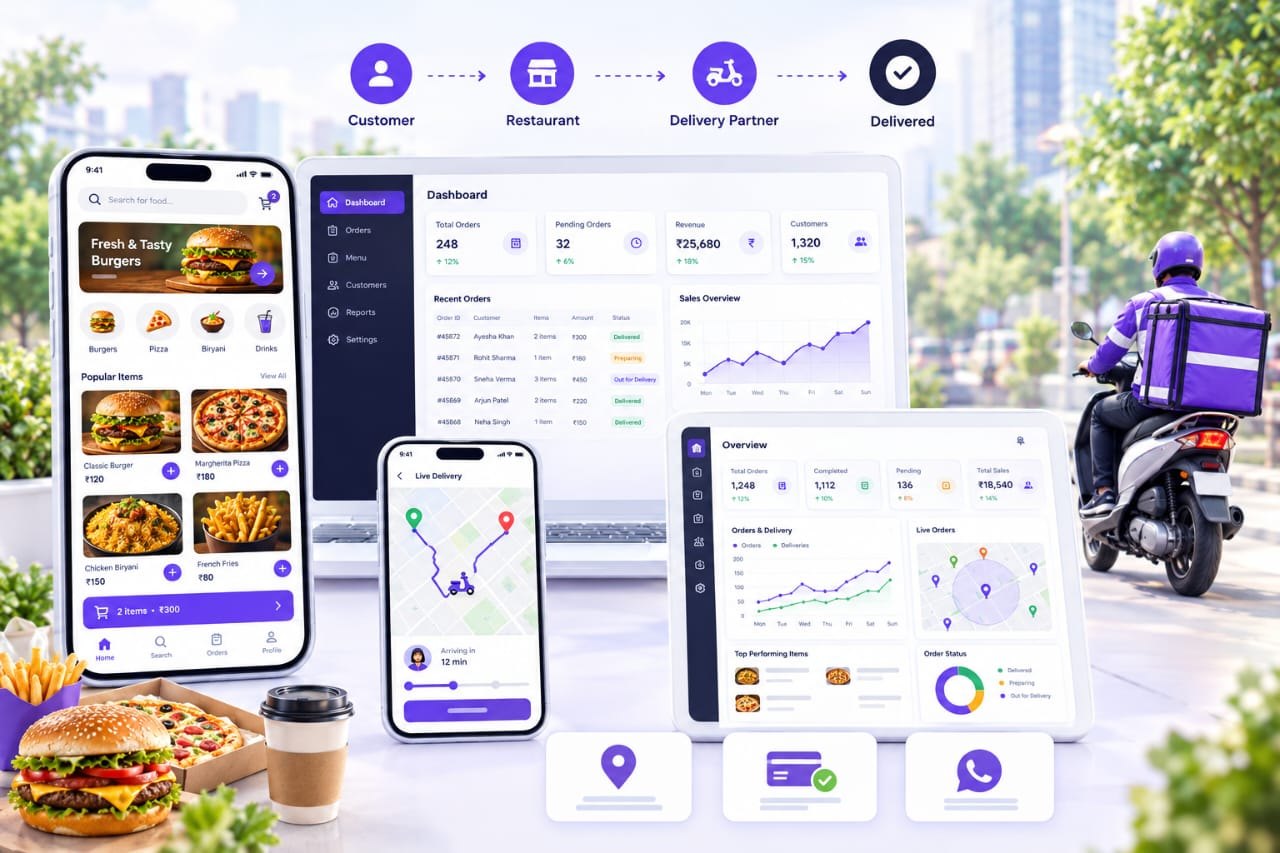
Food delivery customer app, delivery partner app and restaurant panel shown together

We develop feature-rich food delivery platforms that connect customers, restaurants, and delivery partners through an integrated digital ecosystem. Whether you want to build a Single Vendor Food Delivery App for your own restaurant or a Multi Vendor Food Delivery App that allows multiple restaurants to sell on one platform, our solutions can be customized according to your business model, operational requirements, and future growth plans.

What Does Our Food Delivery App Development Solution Include?

Our food delivery app development services cover the essential applications, management panels, and integrations required to run an online food delivery business.

  • Customer Mobile App: Allow users to browse food menus, place orders, make payments, apply coupons, and track deliveries.
  • Delivery Partner App: Enable delivery executives to manage assigned orders, update delivery statuses, navigate to locations, and monitor their earnings.
  • Restaurant & Vendor Panel: Help restaurants manage menus, prices, availability, incoming orders, and sales.
  • Admin Dashboard: Manage customers, restaurants, delivery partners, orders, commissions, payments, and business reports from one centralized panel.
  • Online Payment Integration: Support digital payments through compatible payment gateways, along with Cash on Delivery where required.
  • Live Order & Delivery Tracking: Provide order status updates and location-based tracking using suitable map and location services.
  • Notifications & Communication: Send order confirmations, delivery updates, OTPs, and customer notifications through supported services.
  • Business Reports & Analytics: Monitor order volumes, sales, commissions, delivery performance, and other important business metrics.
Business models

Single Vendor vs Multi Vendor Food Delivery App Development

Choosing the right business model is one of the most important decisions when developing a food delivery application. A Single Vendor Food Delivery App is designed for a single restaurant or food business, whereas a Multi Vendor Food Delivery App allows multiple restaurants and food vendors to sell their products through one common platform.

How a food delivery platform works: customer orders, the restaurant dashboard manages the order, a delivery partner delivers it and the customer receives the food
How it fits together: customer order, restaurant panel, delivery partner and admin control in one connected platform.

Both models can include customer mobile apps, delivery partner apps, an admin dashboard, online payments, order tracking, and notifications. However, their restaurant management workflows, vendor registration, commission systems, reporting, and administrative controls differ according to business requirements.

Key differences at a glance

FeatureSingle VendorMulti Vendor
Restaurant ManagementOne restaurant or businessMultiple restaurants
Restaurant RegistrationNot required for external vendorsVendor registration and onboarding
Vendor Approval SystemNot requiredRequired
Menu ManagementCentralizedSeparate for each vendor
Food PricingManaged by the businessManaged by individual vendors, subject to platform rules
Order ManagementOne restaurant's ordersVendor-wise order routing and tracking
Vendor DashboardGenerally not requiredDedicated vendor dashboard
Commission ManagementGenerally not requiredPlatform commission configuration
Vendor SettlementNot required for external vendorsVendor payout and settlement records
Delivery ManagementManaged for one businessShared fleet or vendor-specific delivery model
Restaurant-Wise ReportsNot requiredRequired
Coupons & DiscountsBusiness-specific offersPlatform-wide and vendor-specific offers
Admin DashboardBusiness operations managementMarketplace and vendor management
Revenue ModelSales of own productsCommissions, subscriptions, fees, or other models
Operational ComplexityComparatively simplerComparatively more complex due to multiple vendors and workflows

Single Vendor Food Delivery App

A Single Vendor Food Delivery App is developed for a restaurant, cloud kitchen, café, bakery, or food chain that wants to accept online orders directly from customers. The business operates under its own brand and manages its menu, pricing, food availability, orders, payments, and delivery operations.

This model is ideal for businesses that want to establish their online presence, improve customer convenience, build brand loyalty, and manage food delivery without operating a marketplace for external restaurants.

Key features of a Single Vendor Food Delivery App

  • Customer App: User registration, restaurant menu, food categories, search, cart, checkout, coupons, online payments, order history, and ratings.
  • Menu Management: Add or edit food items, descriptions, prices, variants, add-ons, and availability.
  • Order Management: Receive orders, confirm or reject orders, update preparation status, and manage cancellations.
  • Delivery Management: Assign delivery partners, manage pickup and delivery status, and track orders.
  • Payment Management: Online payments, Cash on Delivery, transaction records, refunds, and sales reports.
  • Offers and Discounts: Promo codes, discounts, special offers, and customer loyalty features where required.
  • Customer Management: Manage customer profiles, addresses, order history, and support requests.
  • Admin Dashboard: Control the restaurant's operations, menu, orders, delivery settings, and business reports.
  • Notifications: Send order confirmations, payment updates, and delivery notifications.

Best suited for: Individual restaurants, restaurant chains, cloud kitchens, cafés, bakeries, and food businesses selling their own products.

Multi Vendor Food Delivery App

A Multi Vendor Food Delivery App is designed for businesses that want to build an online food marketplace where multiple restaurants can register, list their menus, receive orders, and manage their individual operations through the same platform.

The platform owner manages the overall marketplace, while each approved vendor operates through a dedicated vendor panel. This model can generate revenue through restaurant commissions, vendor subscriptions, delivery charges, promotional listings, or a combination of these methods.

Key features of a Multi Vendor Food Delivery App

  • Multi-Restaurant Listing: Display multiple restaurants with individual menus, prices, cuisines, operating hours, and availability.
  • Vendor Registration: Allow restaurants to submit registration details, business information, documents, and bank details for approval.
  • Vendor Dashboard: Enable each restaurant to manage its profile, menu, prices, orders, opening hours, and food availability.
  • Vendor Approval and Verification: Let administrators approve, reject, suspend, or activate vendor accounts.
  • Commission Management: Configure platform commissions for vendors, including percentage-based or fixed-fee models where required.
  • Vendor Settlements: Calculate payable amounts, commissions, adjustments, refunds, and settlement records.
  • Multi-Restaurant Order Management: Route orders to the appropriate restaurant and manage each vendor's order workflow.
  • Delivery Assignment: Assign deliveries according to the agreed operational model, such as a shared delivery fleet or vendor-managed delivery.
  • Location-Based Restaurant Discovery: Show relevant restaurants according to customer location, delivery radius, and service availability.
  • Vendor Performance Reports: Track restaurant-wise orders, revenue, cancellations, ratings, and commission records.
  • Marketplace Promotions: Manage platform-wide offers, vendor-specific discounts, featured restaurants, and sponsored listings.
  • Centralized Admin Control: Manage vendors, customers, delivery partners, orders, commissions, payments, disputes, and marketplace analytics.

Best suited for: Food delivery startups, restaurant aggregators, city-level food marketplaces, and businesses planning to onboard multiple restaurants.

Features

Complete Feature List for the Customer and Delivery Partner Apps

Pick a tab to see what each app includes. Final features depend on the selected single-vendor or multi-vendor model, delivery workflow and approved project scope.

Customer Food Delivery App Development

The Customer Mobile App enables users to discover restaurants, explore food menus, place orders, make secure payments, and track deliveries in real time. Designed for a smooth and convenient ordering experience, the app helps customers manage their food orders from browsing to doorstep delivery.

ModuleFeatures & Functionality
1Registration & LoginMobile number login, OTP verification, email login, social login (optional), logout and account deletion
2User ProfileName, mobile number, email, profile photo and account settings
3Location ManagementGPS location detection, manual location selection, multiple delivery addresses and saved addresses
4Home ScreenPromotional banners, food categories, featured restaurants, popular dishes, recommended items and special offers
5Restaurant ListingRestaurant name, logo, cuisine, rating, estimated delivery time, delivery charges and availability
6Search & FiltersSearch restaurants and dishes; filter by cuisine, price, rating, offers and vegetarian options
7Food MenuFood images, descriptions, prices, variants, add-ons, availability and customization options
8Cart ManagementAdd/remove items, update quantities, select variants and review order details
9CheckoutDelivery address, contact details, delivery instructions, order summary and applicable charges
10Offers & CouponsApply promo codes, view discounts, promotional offers and eligibility conditions
11Payment OptionsIntegrated payment gateway, UPI, cards, net banking, supported wallets and Cash on Delivery where enabled
12Order PlacementConfirm orders, receive order ID and view order confirmation
13Live Order TrackingTrack order progress, view delivery partner details and location when supported
14Order HistoryView previous orders, order details, invoices or receipts and reorder options
15Ratings & ReviewsRate restaurants, food items and delivery experience; submit reviews
16NotificationsOrder confirmation, preparation updates, dispatch alerts, delivery updates and relevant promotions
17Wishlist / FavoritesSave favorite restaurants or dishes for quick access
18Customer SupportContact support, FAQs, help requests and order-related complaints
19Cancellation & RefundsRequest cancellations and track refund status according to configured policies
20Settings & PrivacyManage preferences, notification settings, privacy information and account deletion

Advanced Customer App Features

These features can be added depending on the business model and project budget.

  • Scheduled Orders: Order food for a selected future date or time.
  • Multiple Carts / Restaurant Rules: Handle restaurant-specific cart restrictions and checkout workflows.
  • Loyalty & Rewards: Earn points, redeem rewards and access membership benefits.
  • Wallet System: Manage promotional credits, refunds or prepaid balances, subject to applicable policies.
  • Subscription Plans: Offer free delivery or other benefits to eligible subscribers.
  • Multi-Language Support: Allow customers to use the app in supported languages.
  • Referral Program: Reward eligible customers for referring new users.
  • Group Ordering: Let multiple people contribute to a shared order, if required.
  • Accessibility Options: Improve usability with readable text, clear controls and accessible navigation.

Food Delivery Partner App Development

The Delivery Partner Mobile App is designed for riders and delivery executives who collect orders from restaurants and deliver them to customers. It helps businesses assign deliveries, monitor order progress, manage delivery personnel and maintain accurate delivery records. The app can support either a company-managed delivery fleet or a vendor-specific delivery model, depending on the food delivery business's operational requirements.

ModuleFeatures & Functionality
1Registration & LoginMobile number login, OTP verification and secure account access
2Rider ProfileName, photo, mobile number, email and personal details
3Document VerificationDriving licence, identity proof, vehicle details and other required documents
4Admin ApprovalPending, approved, rejected or suspended rider status
5Online / Offline StatusAllow riders to mark themselves available or unavailable for deliveries
6Delivery DashboardToday's assigned orders, pending deliveries, completed orders and earnings summary
7New Delivery RequestsReceive delivery offers with relevant pickup, drop and earning information
8Accept / Reject OrdersAccept or decline requests according to the configured assignment policy
9Order DetailsOrder ID, restaurant details, customer address, contact options and delivery instructions
10Pickup ManagementNavigate to the restaurant and confirm order pickup
11Navigation & MapsView routes, pickup locations, customer destinations and distance information
12Delivery StatusUpdate statuses such as accepted, arrived at restaurant, picked up, on the way and delivered
13Customer ContactCall or message customers through supported communication methods
14Delivery VerificationOTP-based delivery confirmation, proof of delivery or other configured verification methods
15Earnings DashboardView delivery earnings, incentives, adjustments and payment summaries
16Delivery HistoryView completed, cancelled and assigned delivery records
17Cash on DeliveryRecord cash collected from customers and maintain cash reconciliation records
18NotificationsNew delivery requests, assignment changes, customer updates and important announcements
19Support & ComplaintsReport failed deliveries, restaurant delays, incorrect addresses and other issues
20Profile & SettingsUpdate permitted details, manage preferences and log out

Advanced Delivery Partner App Features

  • Smart Delivery Assignment: Assign orders based on availability, distance, delivery zones or other configured rules.
  • Multi-Order Delivery: Allow one rider to carry multiple eligible orders where operationally suitable.
  • Geofencing: Verify arrival near a restaurant or delivery destination using location permissions.
  • Delivery Performance: Track completed deliveries, acceptance rates, delivery times and customer feedback.
  • Incentive Management: Configure bonuses, peak-hour incentives and delivery targets.
  • Shift Management: Set rider shifts, working hours and attendance where required.
  • Payout Management: Maintain payment statements and settlement records.
  • Emergency Support: Provide a quick way to contact the operations team in case of a delivery issue.

Integrations

Third-Party Integrations

Your food delivery app connects with trusted external services for payments, maps, OTP, notifications, hosting and app publishing.

Razorpay logo

Payment Gateway

Online payments via UPI, cards and net banking.

Google Maps logo

Google Maps Platform APIs

Maps, address search, routes and rider navigation.

MSG91 logo

SMS & OTP Verification Service

OTP login and order SMS alerts.

WhatsApp Business logo

WhatsApp Business Platform

Order and delivery updates on WhatsApp.

Firebase logo

Firebase Services

Push notifications, crash reports and analytics.

AWS logo

Server & Cloud Hosting

Hosting for backend, database and admin panel.

Domain Registration logo

Domain Name & SSL/HTTPS

Your website address with secure HTTPS.

Google Play Console logo

Google Play Console

Publish and update the Android apps.

Apple App Store logo

Apple Developer Program

Publish and update the iOS apps.

reCAPTCHA logo

Security & Abuse Protection

Protection from bots and fraudulent signups.

Please note: these services have their own usage or subscription charges, payable separately by the client unless included in the quotation. We help with setup and integration as agreed in the project scope.

Launch essentials

What You Need to Launch

How the apps work together, what to plan for, and why businesses build their food delivery platform with SoftFYR.

How both apps work together
  1. Step 1: Customer Places an Order. The customer selects food, enters the delivery address and confirms the order.
  2. Step 2: Restaurant Accepts the Order. The restaurant prepares the food and updates the order status.
  3. Step 3: Delivery Partner Collects the Order. The rider receives an assignment, reaches the restaurant and collects the package.
  4. Step 4: Order Is Delivered. The rider delivers the food and confirms completion; the customer receives the final status.
Important development notes

Final features depend on the selected single-vendor or multi-vendor model, delivery workflow and approved project scope.

  • Customer App: Android, iOS or both.
  • Delivery Partner App: Android, iOS or both.
  • Backend: Shared APIs, order management, location updates and notifications.
  • Admin Panel: Manage users, riders, orders, delivery zones and reports.
  • Third-Party Services: Maps, payment gateway, OTP/SMS and push notifications may require separate accounts and usage charges.
Why choose SoftFYR Technologies?

Turn your food delivery idea into a powerful digital platform. Whether you want to launch a food delivery app for your own restaurant or build a multi-vendor marketplace connecting multiple restaurants, SoftFYR Technologies can help you develop a solution tailored to your business goals.

From customer mobile apps and delivery partner applications to restaurant management, admin dashboards, online payments and third-party integrations, we help you bring your food delivery business together on one platform.

  • Customized solutions for single-vendor and multi-vendor business models
  • User-friendly mobile applications and management dashboards
  • Flexible features based on your business requirements
  • Integration with relevant payment, mapping and notification services
  • Scalable architecture designed to support future business growth
  • Deployment assistance and project handover as agreed in the project scope

Want to Build Your Own Food Delivery App? Contact SoftFYR Technologies to discuss your requirements and get a customized development proposal. Get a Free Consultation →

FAQs

Food Delivery App Development: Frequently Asked Questions

Who can benefit from food delivery app development?

Our custom food delivery software solutions suit businesses looking to establish or expand their digital food ordering operations, including restaurants and restaurant chains, cloud kitchens and takeaway businesses, food delivery startups, multi-restaurant marketplace owners, cafés, bakeries and fast-food outlets, and local food delivery businesses serving specific cities or regions.

Why choose a custom food delivery app?

A custom-built food delivery platform gives you greater control over your branding, business workflows, customer experience and revenue model. Depending on your requirements, the platform can support restaurant commissions, delivery charges, subscription plans, promotional offers and other business models.

What is the difference between a single vendor and a multi vendor food delivery app?

A Single Vendor Food Delivery App is designed for a single restaurant or food business, whereas a Multi Vendor Food Delivery App allows multiple restaurants and food vendors to sell their products through one common platform. Their restaurant management workflows, vendor registration, commission systems, reporting and administrative controls differ according to business requirements.

Which apps and panels does the solution include?

The solution covers a customer mobile app, a delivery partner app, a restaurant and vendor panel, an admin dashboard, online payment integration, live order and delivery tracking, notifications, and business reports and analytics. Final features depend on the selected single-vendor or multi-vendor model, delivery workflow and approved project scope.

Can the apps be built for Android, iOS or both?

Yes. The customer app and the delivery partner app can each be built for Android, iOS or both, depending on your project scope.

Can customers pay online and with Cash on Delivery?

Yes. The platform supports digital payments through compatible payment gateways, along with Cash on Delivery where required.

Do third-party services cost extra?

Yes. Services such as maps, payment gateway, OTP/SMS, push notifications, hosting and app store accounts have their own usage or subscription charges, payable separately by the client unless included in the quotation. We help with setup and integration as agreed in the project scope.

People with laptops around large FAQ letters and a magnifying glass

Related services

Explore More From SoftFYR

Get started

Get Your Customized Development Proposal

Tell us about your idea and whether you need a single-vendor or multi-vendor platform, the apps you want, and your delivery area.

Tell Us About Your Food Delivery Business

Share a few details and our team will get back to you with the right food delivery app solution.

No obligationWe reply shortlyYour details stay private
+91
Required platforms *